
What Client Billing is and what it costs
Client Billing charges your clients by card through your own Stripe account. The fee is 12.5% of each payment on Free or 3.5% on Pro, plus Stripe's fee.

Client Billing lets you charge your clients for coaching from inside QuickCoach. You connect your own Stripe account, set up your packages once, and send each client a secure link to pay by card. Stripe takes the payment and pays it out to your bank. It's available on every plan, Free and Pro, and it's entirely optional.
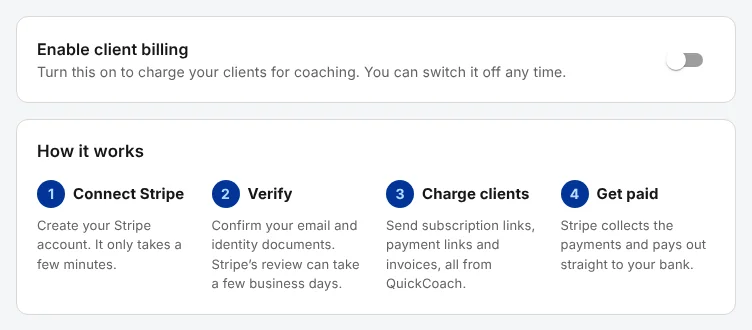
You'll find it in Account Settings, under 'Client Billing'. Switching on 'Enable client billing' is the first step of connecting Stripe.
How much does Client Billing cost?
There's no monthly charge for Client Billing, and creating the Stripe account is free. Each payment a client makes carries two fees:
| Fee | On Free | On Pro |
|---|---|---|
| QuickCoach platform fee | 12.5% of each payment | 3.5% of each payment |
| Stripe's processing fee | Stripe's card rate for your country | Stripe's card rate for your country |
Stripe's fee is charged to your Stripe account, so it comes out of what Stripe pays you. QuickCoach doesn't set it or take a share of it. The rates depend on your country and your client's card, and Stripe's pricing page lists them.
Who pays the fees, you or your client
Every package has a 'Card fees' choice, under 'More options' when you create it.
- 'Built into the price' (the default). Your client's price is raised so that, after the QuickCoach fee and an estimate of Stripe's fee, you receive about the price you set. On Free, a package you price at A$450 costs your client A$524.83.
- 'Taken from your payout'. Your client pays exactly your price, and both fees come out of what you receive.
Stripe's real fee varies a little from card to card, so with 'Built into the price' you can end up a few cents either side of your price. Creating your packages has the details.
What happens to your fee when you change plans
Upgrading to Pro lowers the platform fee from 12.5% to 3.5%, but it reaches your packages and subscriptions differently.
- Subscriptions follow your plan. Each live subscription moves to your current fee from its next payment. That works in both directions: if your Pro plan ends, subscriptions move back to 12.5% while your clients keep paying the same price. On a 'Built into the price' package, you then take home less than the rate you set.
- One-off packages keep their fee. A package's price is fixed in Stripe when you create it, so a one-off package charges the fee it was created with. After upgrading, create a new package and archive the old one to charge the Pro rate.
Which countries can use Client Billing?
You can connect a Stripe account based in Australia, Austria, Belgium, Brazil, Bulgaria, Canada, Croatia, Cyprus, Czech Republic, Denmark, Estonia, Finland, France, Germany, Gibraltar, Greece, Hong Kong, Hungary, India, Indonesia, Ireland, Italy, Latvia, Liechtenstein, Lithuania, Luxembourg, Malaysia, Malta, Mexico, Netherlands, New Zealand, Norway, Poland, Portugal, Romania, Singapore, Slovakia, Slovenia, Spain, Sweden, Switzerland, Thailand, United Arab Emirates, United Kingdom and the United States.
Pick your country carefully, because Stripe fixes it when your account is created. Your packages are priced in your Stripe account's currency, which follows your country: an Australian account charges in Australian dollars, for example. You can't choose a different currency for a package. The lowest price you can set is 0.50 in your currency.
What Stripe handles and what QuickCoach does
Stripe handles the money. It checks your identity and bank details, hosts the secure checkout page your client pays on, keeps their card, pays out to your bank on your payout schedule, and deals with disputes and tax forms. QuickCoach never sees or stores your clients' card details. Your Stripe account is a standard one that belongs to you, with its own Stripe Dashboard.
QuickCoach looks after the coaching side: your packages, the payment links you send, a record of who has paid, refunds and cancellations from a client's profile, and an email when a payment comes in.
Or bill your own way, with no QuickCoach fee
You don't have to use Client Billing. If you'd rather keep taking bank transfers, PayPal or payments through your gym's system, carry on: QuickCoach charges nothing on money that doesn't go through Client Billing. Billing your clients compares the two ways, and includes a plan-builder recipe for simple invoices.