
Charge a client
Charge a client from their profile: pick a package, create a payment or subscription link, then email it or copy it. What happens next, and how invoices work.

You charge clients one at a time, from their profile, by sending them a link to pay. A one-off package gives you a payment link. A recurring package gives you a subscription link, which charges your client's card on its schedule until the subscription is cancelled.
You'll need a Stripe account that's ready to take payments and at least one package. Packages come from creating your packages.
Create a payment link
- Open the client's profile from your client list, and click the 'Billing' tile.

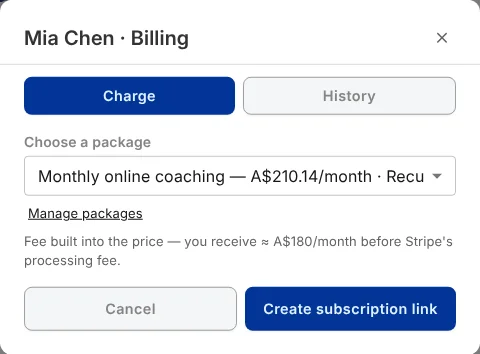
- On the 'Charge' tab, pick a package from 'Choose a package'. The note underneath shows how the fee works for that package.
- Click 'Create subscription link' for a recurring package, or 'Create payment link' for a one-off one.
- Click 'Email to client' to send the link, or 'Copy link' to send it yourself in a text or message.
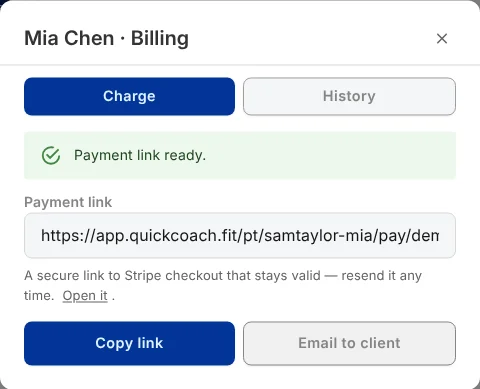
'Email to client' sends the link to the email address on your client's profile. If they haven't got one, QuickCoach tells you, and you can copy the link and send it yourself.
About the link
The link is a QuickCoach address that takes your client to Stripe's secure checkout. It doesn't expire, so you can send it again whenever you need to. Once it's been paid, opening it again takes your client back to their QuickCoach page rather than charging them a second time.
What happens next
- Your client pays on Stripe's checkout page. What your client sees walks through it from their side.
- The payment appears on the 'Payments' tab in Client Billing, and on the 'History' tab of this window.
- QuickCoach emails you when the payment comes in. On Pro, you also get it in your Notification Center and as a push notification.
- Stripe pays the money out to your bank on your Stripe payout schedule.
Invoices
There's no separate way to send an invoice. A link is the request for payment, and Stripe creates the invoice: you'll find an 'Invoice' or 'Receipt' button next to each paid payment on the 'Payments' tab. Whether Stripe also emails your client a receipt is a setting in your Stripe Dashboard.
If you'd rather bill some clients outside Client Billing, the invoice plan in billing your clients still works.