
All about habit tracking
Assign daily habits alongside training, pick the right response type for each one, start from ready-made packs and coach from the full habit history.

Habit tracking lets you assign daily habits to your clients right alongside their training, so the behaviours that drive results get tracked in the same place as the workouts. It comes with multi-habit tracking on QuickCoach Pro. This article covers how it works from end to end: assigning habits, how clients log them, and how to use the history.
How it works
Habits are simple daily actions your clients respond to in QuickCoach, things like hitting a step count, getting protein in at every meal, or being in bed by a set time. You assign the habits, your clients respond each day, and the full history builds up in their profile.
Habits don't live inside plans. You build them once in your Habits Library (click Habits in the navigation) and assign them from there, or manage one client's habits from the Habit Tracking tile on their client page. Either way, they show up on the client's home screen above their plans.
Each client gets their own habit stack. A 52-year-old rebuilding a walking routine and a competitive lifter chasing a protein target are not the same person, so they should not be working off the same checklist. The setup steps are in creating custom habits for individual clients.
Response types
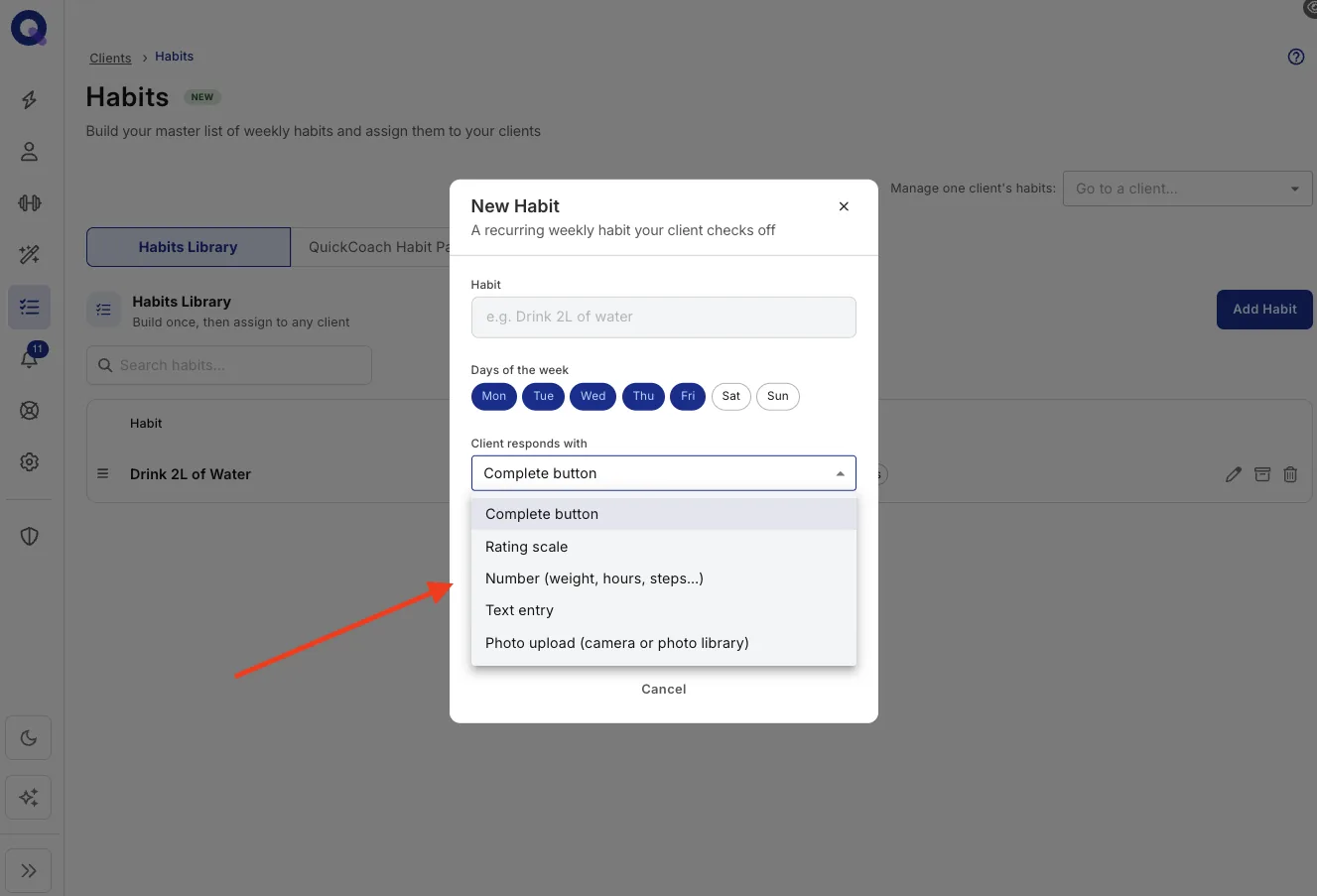
Every habit has a response type, so you can ask for the right kind of answer. There are five:
- A complete button for anything that simply did or did not happen
- A rating scale (1 to 5 or 1 to 10) for anything subjective, like sleep quality or energy
- A number for anything measurable, like steps or litres of water
- A short text answer, for a daily win or what got in the way
- A photo, taken or picked from the client's library, for meals or weekly progress shots
The complete button works on every plan. Ratings, numbers, text and photo check-ins are part of Pro. To see what each one looks like for the client, watch the short clips in habit tracking on Free and Pro.
Habit packs
Ready-made habit packs cover the ground most coaches assign anyway, so you can put a sensible stack in front of a new client in seconds rather than building every habit from scratch. There are six, from Hydration & Fuel Basics to a Meal Photo Journal. Packs are a Pro feature.
Habit tracking on Free and Pro
Every coach gets habit tracking. On Free, each client can have one active habit with a complete button: done or not done. Pro removes the cap, so you can assign as many habits per client as you like, and lets the client answer each habit in the way that fits it. Every answer is saved to their history.
Here's a client checking in on five habits, one of each type: a tap for water, a sleep rating, a step count, a quick note on the day's win and a photo of a post-workout meal.
| Response type | What the client does | Good for | Plan |
|---|---|---|---|
| Complete button | Taps once to mark it done | Yes/no habits like "drink 2 L of water" | Free and Pro |
| Rating scale | Picks a score on a 1 to 5 or 1 to 10 scale | Sleep quality, energy, stress | Pro |
| Number | Types a value | Steps, hours slept, body weight | Pro |
| Text | Writes a short note (up to 500 characters) | A daily win, what got in the way | Pro |
| Photo | Takes a photo or picks one from their library | Meal photos, weekly progress shots | Pro |
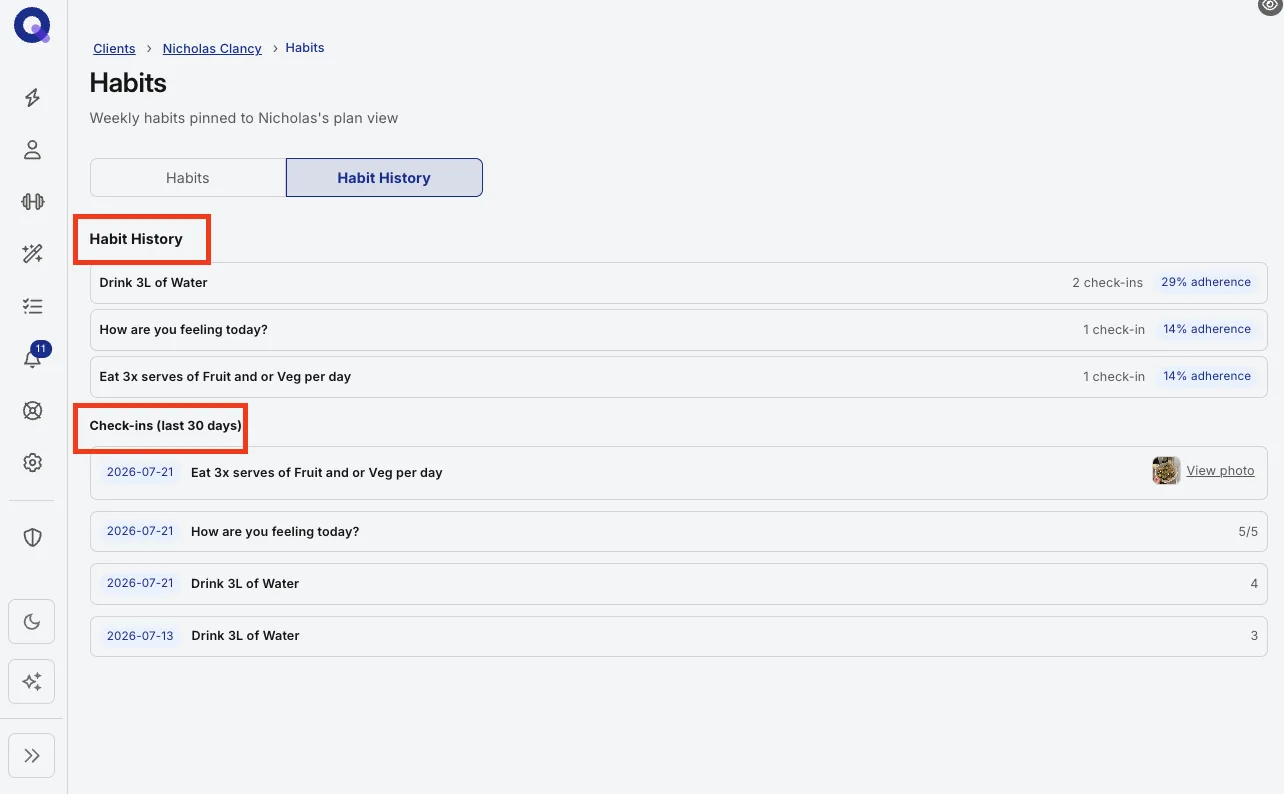
On your side, the client's habit history shows each answer by day: the rating, the number, the note, or a thumbnail you can open full size. An adherence percentage sits next to each habit, so a slipping habit stands out before the next check-in call. You can read it on every plan, Free included.
Pro also adds the habit packs and gives clients their own habit history, in the Habit Consistency section of their Activity tab.
Even with no cap, keep each client's list short. Two or three habits done for six weeks beat eight habits abandoned by Friday. Rotate new habits in as old ones become automatic.
For your clients
Habits appear on the home screen of your client's app and take one tap a day. There is nothing for them to set up. For the full client-side walkthrough, see the client guide to logging habits.
Why the history matters
Full habit history is the underrated half of this. When a client says they have been consistent and the record says otherwise, you are not arguing from memory. You are both looking at the same data, which turns an awkward conversation into a factual one. See viewing client habit results.
Read a client's habit history
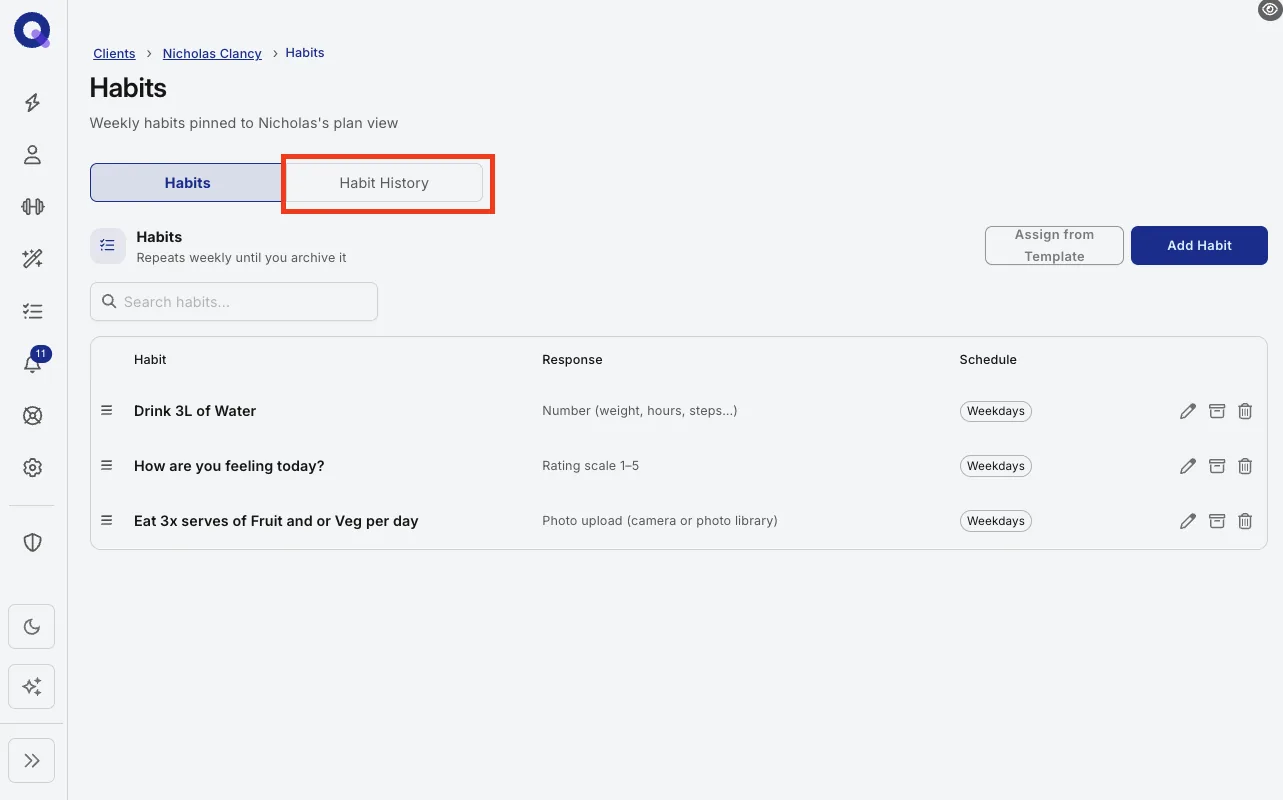
- Go to your Clients page, open the client, and click the Habit Tracking tile. The page that opens has two tabs, Habits and Habit History.
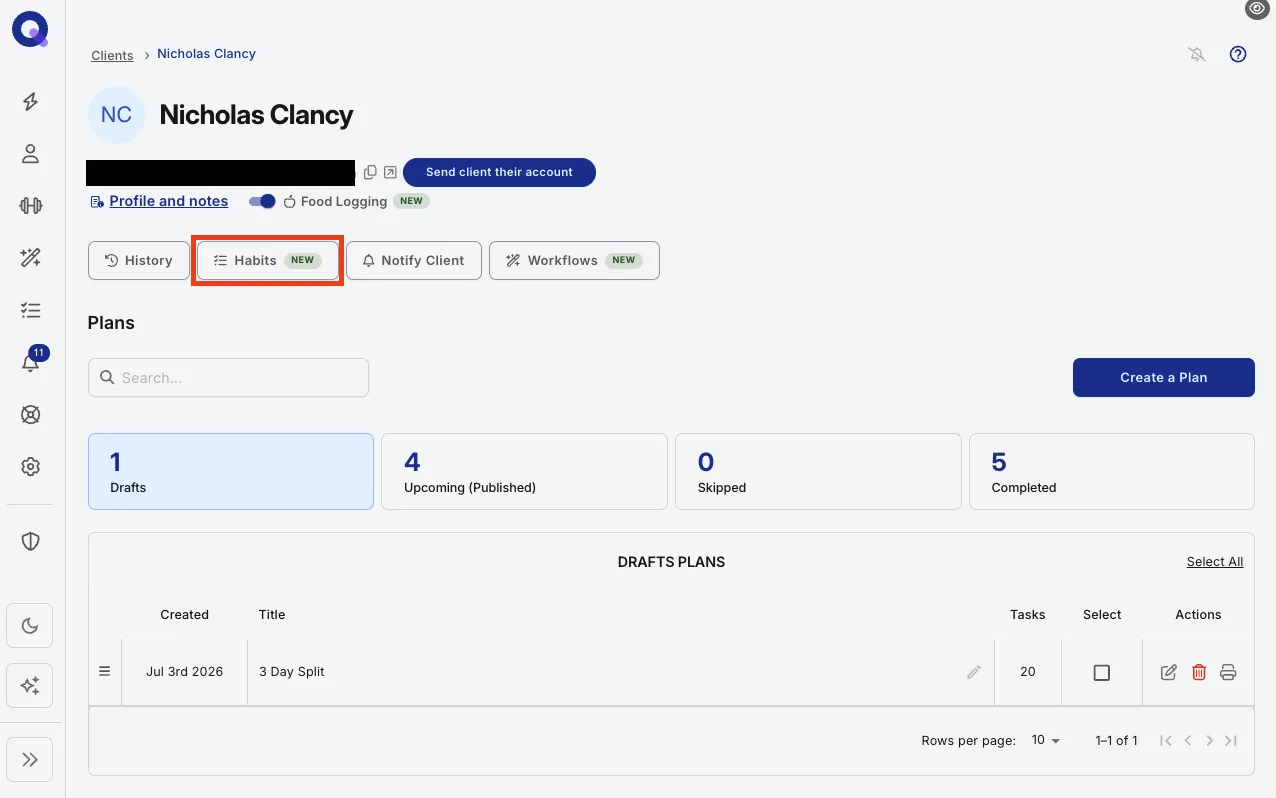
- Open the Habit History tab.
- Read the history: every habit in the client's stack with their full response record and an adherence percentage, so streaks, dips and drift stand out.
The same check-ins also sit on the client's History page, which the Past Performance tile opens, under its Habit Tracking tab.
Note: habit consistency usually slips weeks before results do, so a quick scan before every check-in catches problems while they're still small.
Run habit coaching as a service
Habits can carry a whole coaching service on their own, not just sit next to training. The loop is simple: build each client's stack, let them respond daily from their home screen, and coach off the history at every check-in.
A structure that works: start every client with one visible habit, such as daily steps or a hydration check-in, in week one before the training conversation gets complicated. Nail two weeks of consistency, then stack the next one. Clients who log something small every day tend to stay far longer than clients you only hear from at session time. Habit packs give you a sensible first habit to start from.
Common questions
Can I edit a habit after I've assigned it? Yes. You can edit, swap or remove habits at any time and the change flows through to your client.
Are habits the same as tasks? No. Habits are recurring daily behaviours with their own history. For one-off actions inside a plan, tasks are the better tool.
Multi-habit tracking shipped in the same July 2026 Pro release as nutrition. Read the announcement for the thinking behind it.
For what's in each pack and how to add one, see using QuickCoach habit packs.