
Creating your QuickCoach account
Sign up in a couple of minutes, no card required, and start coaching on the free plan straight away.

QuickCoach is free to start. There's no trial clock, no card at sign-up, and nothing to install before you can build your first plan.
How to sign up
- Go to app.quickcoach.fit.
- Enter your name and email, or continue with your Google account.
- Tell us a little about your coaching business so we can set sensible defaults.
- You'll land in your coach dashboard, ready to add a client or build a program.
Your account starts on the Free plan, which covers up to 20 clients with the full programming and workout builder. Nothing expires. When your roster grows past 20 or you want branding and nutrition features, you can move to QuickCoach Pro from inside the app.
QuickCoach runs in any modern browser, and your clients get mobile and web apps of their own. Coach from a laptop, check in from your phone.
Logging in after you've signed up
There are no passwords to remember. Instead, you verify each browser and device once with a short code emailed to you. Here's how to log in:
- Go to app.quickcoach.fit and enter the email address on your account.
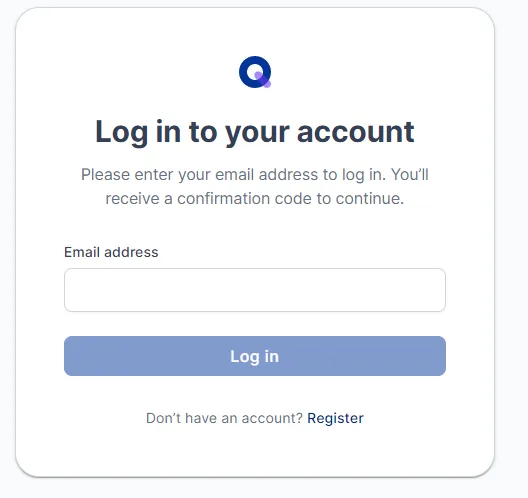
- Check your inbox for a six-digit confirmation code, type it into the box, and click Continue to dashboard.
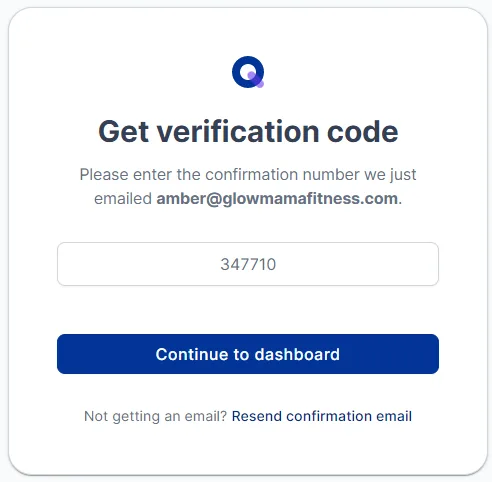
Unless you log out, or switch to a different browser or device, you won't need to verify again.
Tip: bookmark app.quickcoach.fit on every device you coach from. One click takes you straight back to where you left off.
Didn't get the code?
- Check your junk and spam folders. Providers sometimes filter it.
- Search your inbox for "QuickCoach login code", and also for the sender address support@quickcoach.fit.
- If it still hasn't arrived, email support@quickcoach.fit and we'll sort it out.
Ready for the next step? Install the coach app so QuickCoach is one tap away on every device.